Run a reviewable investigation.
QueryBridge is an AI-assisted SQL investigation workbench for data engineers. Start with the executable browser demo, then use a real connection in the local application.
Try the demo →Public demo: real SQL, fictional data
The demo runs SQLite through sql.js/WebAssembly in a browser worker. It is not a PostgreSQL or BigQuery connection. It needs no login, API key or local service. Its explanations are authored guidance; there is no live or recorded Claude output.
- Run the initial SQL. Inspect the rows and the execution ID.
- Load each diagnostic SQL, review it, and choose Run SQL.
- Compare the corrected query and its result with the initial query.
- Export the sample investigation with actual executions, SQL and remaining uncertainty. Reset starts a fresh in-memory demo.
All three scenarios share fictional orders, order lines, shipments and inventory. Identifiers such as 000042 are TEXT; monetary values use integer cents. The first join yields four rows and 32 ordered units instead of three lines and 22 units. The corrected join aggregates shipments to line grain. A delivered filter removes ORD-200 and ORD-300; moving it into ON retains all source order IDs. Valuing receipt movements with full line quantities produces 29,000 cents; using the movement quantities produces 17,000.
These are complete small fixture checks, not production reconciliation. SQLite numeric semantics differ from PostgreSQL; arbitrary fractional expressions can use floating-point arithmetic. The public subset allows one parsed read-only SELECT with scoped tables/functions, up to 200 returned rows and 64 KB. A five-second timeout or Cancel terminates the worker and reseeds data. Queries are never uploaded to a server.
Download the fictional PostgreSQL fixture SQL. Its setup creates a new querybridge_demo schema and refuses to overwrite one that exists.
Watch the working SQL flows
These recordings were captured from the actual application on fictional data. Both use authored guidance, with no live or prerecorded Claude response. They show SQL execution, diagnostics and correction.
Browser SQL investigation
Open the browser SQLite walkthrough recording.
Local PostgreSQL investigation
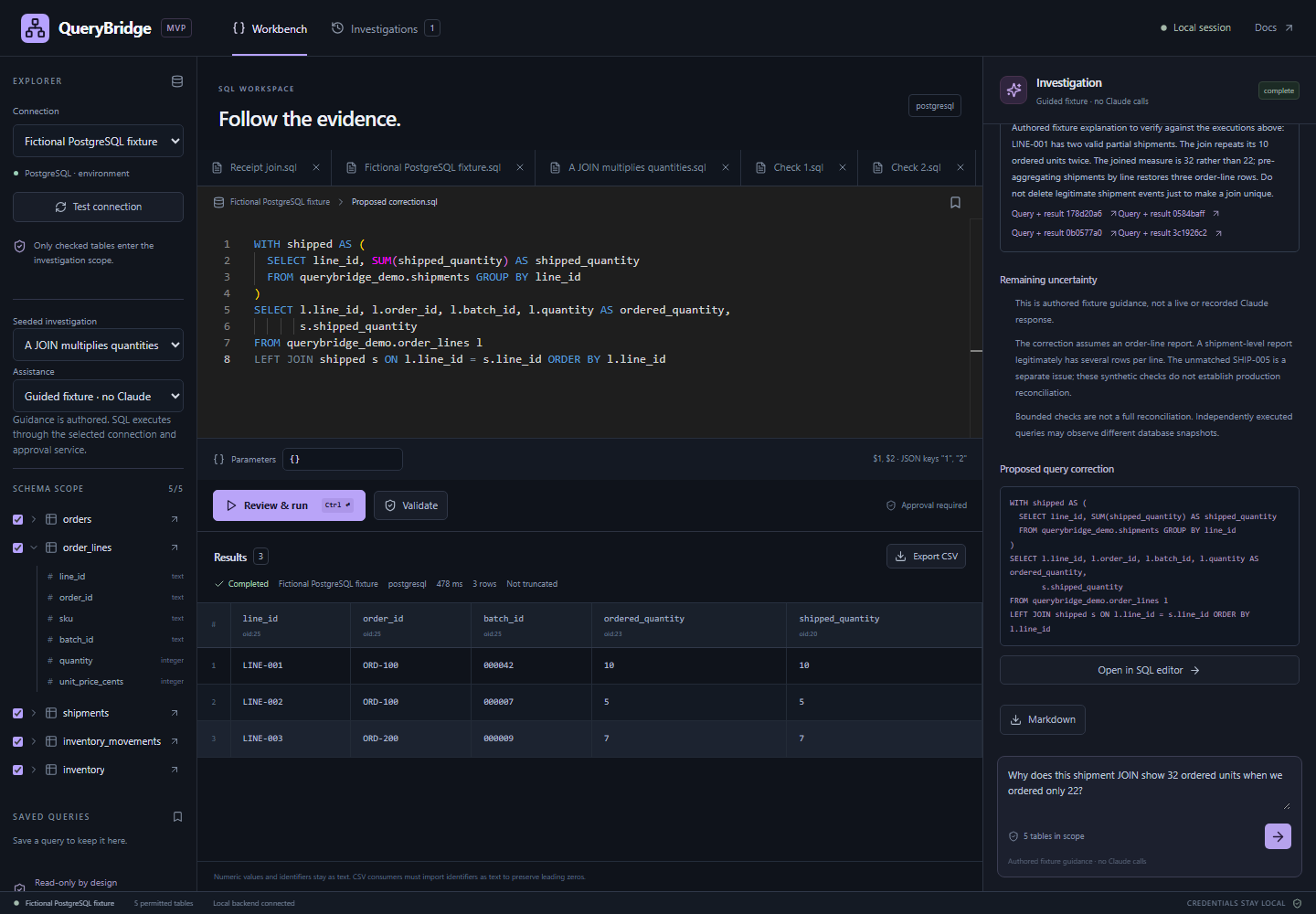
Open the PostgreSQL guided walkthrough recording. Four diagnostic proposals are separately reviewed and approved, then the corrected query returns three order-line rows. Inspect the corrected result screenshot.
Install and run the local application
Source access is currently arranged by email. With the monorepo source and Node.js 24 LTS installed, run from its root:
npm ci
npm run dev -- --workbench-only
Open the workbench address printed by the launcher. Choose the synthetic connection to start without database or Claude credentials. The separate database backend binds to loopback; this public website cannot reach it.
Real PostgreSQL with a disposable fictional fixture
npm run fixture:postgres
This launches an isolated local PostgreSQL database, a dedicated SELECT-only role, the API and workbench. Credentials are generated in process memory. Existing databases are untouched. Select “Fictional PostgreSQL fixture”, test the connection, inspect columns, and choose a seeded investigation. Run the initial query through Review & run and Approve & execute. Guided fixture mode makes no AI call; selecting Claude requires a configured API key. Ctrl+C stops the isolated fixture.
Connect your own permitted PostgreSQL tables
Configure the local environment or the PostgreSQL driver’s local password file. The application never stores passwords in SQLite or browser storage.
PGHOST=your-approved-host
PGPORT=5432
PGDATABASE=your-database
PGUSER=your-read-only-user
PG_ALLOWED_RELATIONS=your_schema.your_table
Supply the password through a protected local environment or PGPASSFILE. Configure TLS for remote databases using the server’s trusted certificate settings. Use a dedicated identity with only needed schema USAGE and table SELECT permissions; deny writes, CREATE and dangerous functions. A PostgreSQL read-only transaction and parser restrictions supplement database permissions. They are not an absolute security guarantee.
Claude assistance and explicit context
ANTHROPIC_API_KEY=configure-locally-only
ANTHROPIC_MODEL=claude-sonnet-4-6
Keep the API key on the local backend and restart it after configuration. With no key, the app says “Claude is not configured.” It does not substitute a fake model reply. Model selection is configurable and live availability must be validated with your account. This release has no live Claude validation or recorded Claude response.
Starting Claude assistance sends only your question, selected SQL, checked schema metadata and non-secret connection metadata. It proposes diagnostic SQL without executing it. Review and approve the exact SQL, connection, parameters, scope and applicable bytes limit. Editing any value requires another approval.
Results stay local until you prepare a payload preview and approve its exact contents. Aggregate-only is the default; bounded redacted rows are opt-in. Default sharing is at most 50 rows per result and 64 KB for the whole payload, with token/time budgets. Evidence references link findings to the actual executed SQL and result IDs. Interpretations and business assumptions remain hypotheses when evidence is insufficient.
What MCP does
The official MCP SDK connects the local first-party server and client. Its five tools list the selected connection, inspect permitted tables/columns, validate SQL and create pending query proposals. They have no shell, filesystem or arbitrary network capability. Tool requests share the same connector and policy service as manual queries. Only the authenticated workbench user can approve execution; the model cannot authorize itself.
The API validates Host and Origin, rejects unrelated websites and DNS rebinding, requires a local session, and binds approvals to their owner and exact values. Comments, SQL literals, database values and tool output are treated as untrusted data. Cancellation, statement timeouts and result bounds are enforced where supported by the driver.
Integration verification
| Integration | Release status |
|---|---|
| Browser SQLite | All three fixture scenarios and expected results tested; no production connection. |
| PostgreSQL | Real isolated fixture tested: metadata, all scenarios, read-only permissions, approvals, results and guided export. No production database was used. |
| Claude API | Official SDK integration and credential-independent request/failure tests. Live API validation not performed; no key configured for this release. |
| BigQuery | Official adapter implemented with dry run, actual/estimated bytes, maximumBytesBilled and cancellation. Live validation pending an explicitly approved synthetic project.dataset.table. Existing ADC is not accessed for this release. |
| SQL Server / Snowflake / Databricks | Roadmap; not implemented. |
A LIMIT bounds rows, not BigQuery cost. Live BigQuery usage requires an approved scope, billing project/location and a bytes cap.
Current limits
This is an independent software project in active development, not a full database administration suite. The local SQL subset rejects writes, DDL, procedures, multiple statements, exports, unsupported functions and out-of-scope tables. Views, external/foreign tables and several advanced SQL constructs are not supported. Local SQLite history is not encrypted; protect your machine and backups. Separate executions may observe different snapshots. Public browser history disappears on reload.
Installation, fixtures, data flow, verification and screenshot/recording reproduction are documented in the source repository. Full reconciliation, additional dialects and broader secret-store support remain roadmap items.
Contact Tiến Nguyễn →